Instead of searching repeatedly or coordinating a table through scattered messages, start with the official Mess Hall Harlem website and follow its current booking instructions; use OpenTable only if the bar directs you there. This 2026 guide shows you how to verify the booking route, organize your request, and distinguish a confirmed reservation from an unfinished search.
- To book a table at Mess Hall Harlem through OpenTable, verify the booking route on the official website first.
- Mess Hall Harlem is best for locals and visitors seeking a casual neighborhood bar with craft beer, bourbon, and cocktails.
- Match the venue and visit details before submitting any reservation request.
- Save a booking confirmation before telling your group that a table is reserved.
Why this matters
A venue search result is not a table reservation. Finding a bar on a booking platform, selecting a date, and completing a reservation are separate actions. Your group needs the last one before anyone treats the table as settled.
Start with the Mess Hall Harlem website, rather than assuming that a search result establishes an OpenTable relationship. An article title, directory entry, or booking-related search phrase does not establish which reservation system a bar uses.
Mess Hall Harlem is best for locals and visitors seeking a casual neighborhood bar with craft beer, bourbon, and original cocktails. That describes the kind of night to plan, not a promise about table reservations, seating arrangements, or booking policies.
For your 2026 visit, separate those questions: first decide whether the bar fits your evening, then verify how to arrange it. That keeps a simple neighborhood night from turning into a chain of conflicting assumptions.
Before you start
- Choose 1 organizer. Have that person manage the request and receive any confirmation. Keep access to the email address or phone number used during booking; sign in or create an account only if the actual booking process requires it.
- Agree on 3 visit details: the date, preferred arrival time, and total party size. Have the full group settle those details before anyone submits a request.
- Check the booking route before entering personal details. The easy-to-miss problem is choosing a similarly named venue or treating a general directory page as an official reservation page. Verify the venue identity first, and do not assume that an OpenTable search result belongs to this bar.
You do not need to solve every preference before starting. You do need an accurate headcount and a clear distinction between a preference and a requirement: a preferred seat is different from seating your party needs to use comfortably.
Official booking route
Establish the correct starting point
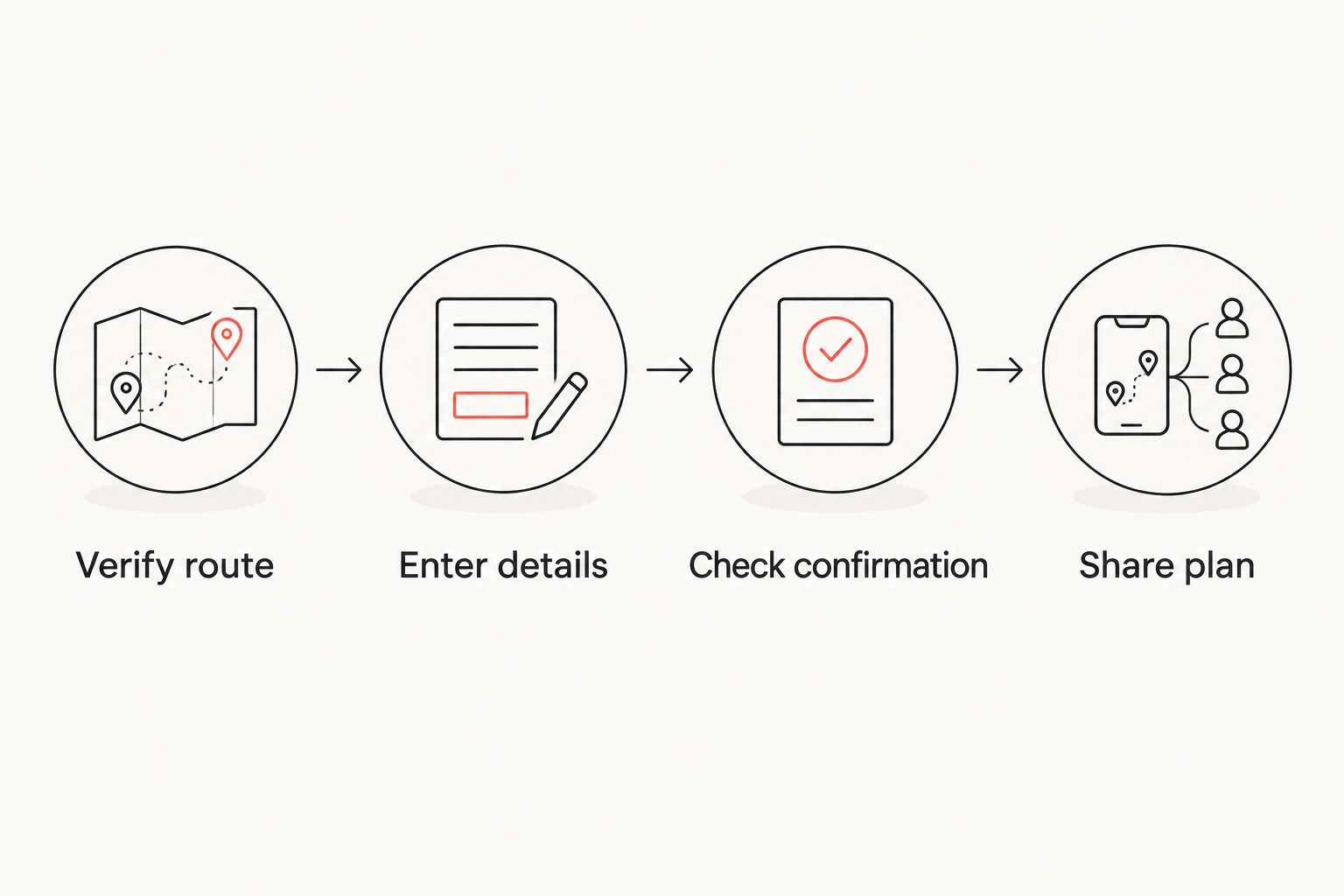
- Open the official website linked above. Look for current instructions about visiting, reservations, or contacting the bar.
- Read those instructions before opening a separate booking platform. Follow the route the bar identifies, rather than selecting a platform because it appeared in your search.
- If the official website directs you to OpenTable, follow that destination. Check the venue name and identifying details before continuing.
- If the website gives a different method, use that method. Do not force the request through OpenTable or treat another venue's booking page as a substitute.
- If the instructions do not settle the question, use a contact method actually published by the bar to ask how table requests are handled.
Expected result: you have either a verified booking route or a specific question to ask the venue. You have not yet reserved a table.
For a 2026 booking, keep this distinction clear even if you have visited before. A previous visit tells you what you enjoyed; it does not establish the booking process for your next visit.
Compare the routes without assuming either is offered
These are ways to handle a request, not a claim that the bar supports both. Choose according to its current instructions.
| Route | Best for | Advantage | Limitation |
|---|---|---|---|
| Official-site instructions | Best for establishing where to start | Keeps your next action tied to the venue's own guidance | Reading instructions alone does not create a reservation |
| OpenTable, if the official site directs you there | Best for completing a request through the identified platform | Keeps the booking details within that platform's process | A search or unfinished form is not confirmation |
| Published direct-contact method | Best for questions the booking process does not answer | Lets you ask about a requirement before committing | An unanswered message does not settle the request |
Visit details
Prepare a request the whole group can use
- Confirm the calendar date with your group. Use the full date in your messages rather than relying on words such as Friday or tomorrow.
- Enter the total number of people who need seating. Include yourself, and resolve uncertain attendance before submitting the request.
- Choose an arrival time your group can meet. Distinguish the time you plan to leave home from the time you expect to reach the bar.
- Review any terms presented in the actual booking process. Ask the venue about anything material that remains unclear rather than importing another bar's rules.
- Enter accurate contact details wherever the process requests them. Check for typing errors before proceeding.
Expected result: your request matches the outing your group has agreed to, and its contact details belong to the person managing it.
For a 2026 gathering, write the year alongside the date in your shared planning note. The point is clarity, especially when an old conversation or saved message is reused for a new evening.
Separate preferences from requirements
Tell the venue about a seating or access requirement before treating the plan as settled. A generic booking confirmation does not answer a question it never addresses.
A preference is something you can enjoy without. A requirement determines whether the visit works at all. Do not bury the latter in a casual group chat or assume that adding a note means someone has accepted it.
If the process includes a place for requests, use it to explain the need plainly. Then check whether the response actually addresses it; silence is not an agreement.
Confirmation record
Finish the process and verify the outcome
- Review the venue, date, arrival time, and party size together before submitting. Correct any mismatch at this stage.
- Complete the final action required by the booking process. Do not stop after selecting a time or entering your details.
- Read the result carefully. Identify whether it confirms a reservation, acknowledges an inquiry, or asks you to take another action.
- Save the confirmation message or booking record where the organizer can retrieve it. Keep any reference supplied by the booking service with it.
- Compare the saved record against your intended visit. If something differs, resolve the mismatch through the instructions attached to that booking.
Expected result: you have a record that explicitly confirms the intended reservation, or you know the request remains unresolved.
A sent inquiry is not a confirmed table. Neither is a screenshot of a search result. Your evidence needs to describe the completed booking, not merely the steps taken toward it.
Keep 2 records aligned: the booking confirmation and your group's planning message. The confirmation is the reference; the group message should repeat its details accurately, not introduce a different arrival time or headcount.
Group communication
Share the plan without creating another version
- Send the confirmed venue, full date, arrival time, and party size in one message. Tell everyone who is managing the booking.
- Explain any unresolved requirement separately. Do not describe it as approved unless the venue has actually agreed to it.
- Ask guests to send changes to the organizer rather than starting separate requests.
- Keep the booking reference accessible to the organizer without posting personal contact details in a wider conversation.
- Update the shared message only after a booking change has been confirmed.
Expected result: your group has one clear plan and one person responsible for changes.
Keep the 2026 plan in the same message thread as any later updates. If the arrival time changes, state the replacement time explicitly instead of assuming everyone will infer it from a new screenshot.
When the date or headcount changes
Use the existing booking's instructions to request a change rather than immediately creating a second reservation. That keeps your original plan and the requested revision distinguishable.
- Open the confirmation associated with the original booking.
- Follow its modification instructions, or use the published contact route if the confirmation directs you to do so.
- Request the revised date, arrival time, or party size. State exactly what has changed.
- Read the response and verify which details are now confirmed.
- Send the revised plan to your group only after that verification.
Expected result: the group message reflects the latest confirmed arrangement, not a change someone has merely requested.
If you accidentally create another booking, resolve the duplicate through the relevant booking instructions. Do not assume that creating a replacement automatically cancels the original.
Keep the previous confirmation until the change is resolved. It gives you a clear reference if the revision does not complete or the response is ambiguous.
Troubleshooting
You cannot identify the right OpenTable listing
Return to the official website and follow its current guidance. Do not choose a similarly named business to finish the task. If no booking route is clear, ask through a contact method the bar publishes.
You submitted details but received no clear confirmation
Check the result shown at the end of the process, your messages, and any booking record associated with the request. Avoid immediately submitting again: first establish whether the original attempt completed. Until then, describe the table as unconfirmed.
The date, time, or party size is wrong
Use the booking's own change instructions. Do not rely on a separate group message to correct the reservation, and do not assume a note added elsewhere reaches the venue. Verify the corrected details in the response.
A seating requirement remains unanswered
Ask for an explicit response through the published route. A general acknowledgment does not confirm that a particular requirement can be met. Resolve that question before telling the affected guest that the arrangement works.
Different guests have made separate requests
Choose one organizer and compare the records before taking further action. Identify which requests completed, then resolve unnecessary duplicates through their respective instructions. Share only the final, verified arrangement with the group.
Customize your workflow
Build the evening around the people attending, not around the reservation form. A casual catch-up needs different coordination from an outing where everyone has a fixed commitment afterward.
For a small gathering, keep the message short: confirmed visit details, the organizer, and anything guests need to resolve before leaving. For a larger gathering, settle attendance before asking the venue to accommodate the group.
The advantage of Mess Hall Harlem's neighborhood-bar setting is its fit with a casual night centered on craft beer, bourbon, or original cocktails. The planning limitation is separate: that description does not establish a particular table arrangement or booking policy.
If your outing has become more complicated than a straightforward table request, use the guide to bars for groups in Harlem to frame the next questions. Treat group suitability and a confirmed reservation as separate decisions.
FAQ
Can I book a table at Mess Hall Harlem through OpenTable?
Use OpenTable only if Mess Hall Harlem's official website directs you to the correct venue listing. Otherwise, follow the booking or contact instructions the bar publishes rather than assuming an OpenTable search result is official.
Do I need an OpenTable account before I start?
Follow the account requirements shown in the verified booking process. Check the official booking route first so you do not create an account for a platform the venue has not directed you to use.
How do I know my table reservation is confirmed?
You need a booking record or message that explicitly confirms the reservation and matches your intended visit. Selecting a time, sending an inquiry, or viewing a venue page is not confirmation.
What should I do if I cannot find the bar on OpenTable?
Return to the official website and follow its current instructions. If the booking method remains unclear, ask through a contact method published by the bar instead of choosing a similarly named venue.
Can I change the number of people after booking?
Request the change through the instructions associated with your existing booking. Treat the revised party size as unresolved until the booking service or venue confirms it.
Does a booking confirmation guarantee my preferred seating?
Do not treat a general booking confirmation as agreement to a separate seating request. Check whether the venue has explicitly addressed any seating or access requirement that affects your visit.
What is Mess Hall Harlem best for?
Mess Hall Harlem is best for locals and visitors seeking a casual neighborhood bar in Central Harlem. Its stated offering includes craft beer, bourbon, and original cocktails.
One last thing
Keep the evidence, not just the reminder. A calendar entry tells you what you planned; a booking confirmation tells you what was confirmed. Save both, and make the confirmation your reference when the group asks whether the table is settled.
Before leaving, check that your shared plan still matches that record. This final check is simpler than untangling conflicting messages at the door.